We currently working on a tutorial on how to merge a mesh application into our nRF5 SDK BLE example. We will update this thread when we finish. For now we provide a quick example so that you can follow.
Mesh stack operates on the timeslot feature provided by the same softdevice used on the nRF5 SDK. So it requires little modification in the Mesh stack to be integrated into a normal BLE example. In fact only modification in the application code needed.
Attached here is an example that we merge the light control server example into ble_app_uart.
For SDK v15.1 and Mesh SDK v2.0.1 please scroll down to the answer on 15th June.
How to test:
Copy Mesh SDK into a "mesh" folder inside "components" folder in SDK v14.1
Unzip the ble_app_uart - MESH into \examples\ble_peripheral in SDK v14.1
Edit PERSISTENT_STORAGE define in nrf_mesh_config_code.h to 0
Build and flash the example. It should work as both ble_app_uart and light control server
Limitation:
Permanent storage of provisioning and configuration is not stored on flash. After reboot, the device would require provisioning again. We are working to fix this. The reason is the flash management on 2 SDKs are not the same and can conflict.
Only S132 v5.0, PCA10040, and SES is supported in the example for now.
Connection interval of BLE application have to be changed >100ms to give enough time for mesh
How to integrate into your own application:
Include all the source file from Mesh example
Include all header folders from Mesh example in Project Option -> Common -> Preprocessor -> Include Directories
Include Preprocessor Definitions in mesh example ( same setting tab as above).
Customize the simple_hal.c to not use GPIOTE_IRQHandler() as it conflicts with the gpiote driver in the SDK
Set PERSISTENT_STORAGE to 0
Edit main.c to add mesh init functions and define.
Add nrf_mesh_evt_handler to SOC observer list with NRF_SDH_SOC_OBSERVER for example:
Add nrf_mesh_on_ble_evt((ble_evt_t *)p_ble_evt); to BLE observer list with NRF_SDH_BLE_OBSERVER; or just simply add it into ble_evt_handler(). (Optional)
Example for SDK v14.2 and Mesh v1.0, nRF52840 and nRF52832:
Light switch client + ble app uart . Send BLE command on NUS service with '0' '1' '2' '3' as button press. Copy mesh SDK into mesh_sdk folder inside nRF5 SDK folder.
I would like to combine ble_app_uart with light_switch_client for PCA10056 or PCA10040.
So I did example for PCA10056 using your advices but I get a few similar errors like: and I dont know where I did mistake.
Could you help me with this problem? I have tried many times but I do not find solution.
I enclose my example. I would be grafefull if you could help me.
ble_app_uart_client.rar
Also I have tried to do example for PCA10040, it compiles without errors but it does not work. Neither mesh nor ble.
Thank you.
I merged ble_app_uart and light_switch, sometimes works, sometimes it does not work. I have to reset my DK a few times and it starts working. I turned on RTT Viewer and saved logs from client.
After flashing:
warnings_after_flashing
I connect client with smartphone (nRF Uart App) and get error:
error;
When I send 3 times message from app to client I get information that: Cannot send.Device is busy:
device_is_busy
I have to reset a few times becasue I still get message that Device is busy and it does not work.
After a few resets everthing is good.
everything_works
I have to reset many times and it is very problematic.
Do you have any ideas?
Have you made sure you have the connection interval (with the phone) >100ms . This is to make sure mesh stack have enough time domain to function. Please try to test first without any BLE activity, no advertising, no connection. Try to test and make sure provisioning works fine, client can send data to server.
I suspect the short connection interval is the culprit here.
And removed errror related to ble_gatt which I have mentioned before.
However the message is still present and I can not send data via mesh.
It seems that provisioning is fine because the message "Successfully provisioned" is visible in server logs.
Maybe I have changed wrong values in connection interval.
Any update on this issue, I am having the same problem. If I disable all the BLE activity it does work but when I have it enabled it will not work. I get the " device is busy ".
These are my BLE settings :
#define SCAN_INTERVAL             0x00A0                                /**< Determines scan interval in units of 0.625 millisecond. */
#define SCAN_WINDOW               0x0050                                /**< Determines scan window in units of 0.625 millisecond. */
#define SCAN_TIMEOUT              0x0000                                /**< Timout when scanning. 0x0000 disables timeout. */

#define MIN_CONNECTION_INTERVAL   MSEC_TO_UNITS(100, UNIT_1_25_MS)      /**< Determines minimum connection interval in milliseconds. */
#define MAX_CONNECTION_INTERVAL   MSEC_TO_UNITS(500, UNIT_1_25_MS)       /**< Determines maximum connection interval in milliseconds. */
#define SLAVE_LATENCY             0                                     /**< Determines slave latency in terms of connection events. */
#define SUPERVISION_TIMEOUT       MSEC_TO_UNITS(4000, UNIT_10_MS)       /**< Determines supervision time-out in units of 10 milliseconds. */
I also added the nrf_mesh_on_ble_evt((ble_evt_t *)p_ble_evt); same as in the BLE uart example. When I follow the code and go to the definition of the code it takes me to nrf_mesh.c.
There I see the following function :
uint32_t nrf_mesh_on_ble_evt(ble_evt_t * p_ble_evt)
{
    /**
     * @todo Populate with GATT handling when the time comes.
     */
    return NRF_SUCCESS;
}
Can I make the assumption this piece of code has not been implemented yet and BLE GATT + BLE mesh models do not work together yet ?
@Toaster: Please try increasing the scan interval and limit the scan window. The mesh stack and BLE stack both requires the radio, so the BLE stack shouldn't occupy the radio for too long. i would suggest to try giving 80% to mesh and 20% for BLE.
@Hung Bui: Could you tell me where can I change values in example ( ble_app_uart combined with light_switch_client) . I do not see variables like SCAN_INTERVAL in light_switch_client and do not know what can I change.


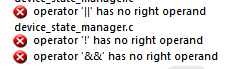 and I dont know where I did mistake.
Could you help me with this problem? I have tried many times but I do not find solution.
I enclose my example. I would be grafefull if you could help me.
and I dont know where I did mistake.
Could you help me with this problem? I have tried many times but I do not find solution.
I enclose my example. I would be grafefull if you could help me.