This post is older than 2 years and might not be relevant anymore
More Info: Consider searching for newer posts

Increasing number of bytes in HID descriptor

Hi,

I'm working on hid keyboard example. How can I check whether multiple bytes are received & transmitted after I increase the assigned no. of bytes in input/output report? From the code I understood that nrf device can send 64 bytes to host device. So how do I append bytes in one packet of 64 bytes when sending to host? How does it work from host side? Does nrf read 1 byte at a time sent from host?

Parents Reply
  • I'm not able to send 26 byte output report from all applications, after that the board just disconnects.

    static void on_hid_rep_char_write(ble_hids_evt_t * p_evt)
    {
        if (p_evt->params.char_write.char_id.rep_type == BLE_HIDS_REP_TYPE_OUTPUT)
        {
            ret_code_t err_code;
            uint8_t  report_val[26];
            uint8_t  report_index = p_evt->params.char_write.char_id.rep_index;
            if (report_index == OUTPUT_REPORT_INDEX)
            {
                // This code assumes that the output report is one byte long. Hence the following static assert is made.
                STATIC_ASSERT(OUTPUT_REPORT_MAX_LEN == 26);//1);
                err_code = ble_hids_outp_rep_get(&m_hids, report_index, OUTPUT_REPORT_MAX_LEN, 0, m_conn_handle, &report_val[0]);
                APP_ERROR_CHECK(err_code);
    			// For HID
    			if (report_val[25] != 0x00)
                {
                    NRF_LOG_INFO("Caps Lock is turned On!");
                    err_code = bsp_indication_set(BSP_INDICATE_ALERT_3);
                    APP_ERROR_CHECK(err_code);
                }
                else if (report_val[25] == 0x00)
                {
                    NRF_LOG_INFO("Caps Lock is turned Off!");
                    err_code = bsp_indication_set(BSP_INDICATE_ALERT_OFF);
                    APP_ERROR_CHECK(err_code);
                }
                else
                {
                    // The report received is not supported by this application. Do nothing.
                }
            }
        }
    }

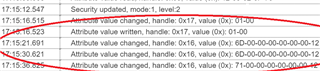
    In nrfConnect, I get this error. What does it mean? Does it mean I can only send 20 bytes?

    With 20 bytes, I can send output report from all applications.

Children
Related