nRF5 SDK is not maintained anymore
More Info: Consider nRF Connect SDK for new designs
This post is older than 2 years and might not be relevant anymore
More Info: Consider searching for newer posts

Thread Border Router networking fail

Hello Nordic Taam:

I follow the WEB steps below

https://infocenter.nordicsemi.com/index.jsp?topic=%2Fsdk_tz_v4.1.0%2Fthread_ot_performance_measurement.html

Software Development Kit > nRF5 SDK for Thread and Zigbee v4.1.0 > Thread > Thread tools > Thread Border Router

nRF52840 DK Version:nRF5_SDK_for_Thread_and_Zigbee_v4.1.0_32ce5f8\examples\thread\ncp\ftd\uart\hex

Raspberry Pi 3 Version:RaspPi_OT_Border_Router_Demo_v4.1.0-1.alpha

Use nRF52840 DK UART connect Raspberry Pi 3 to get the following information

wpan0 => [
"NCP:State" => "associating"
"Daemon:Enabled" => true
"NCP:Version" => "OPENTHREAD/20191113-00534-gc6a258e3; NRF52840; Apr 5 2020 21:51:18"
"Daemon:Version" => "0.08.00d (; Apr 21 2020 19:11:43)"
"Config:NCP:DriverName" => "spinel"
"NCP:HardwareAddress" => [F4CE363EC3C45B0E]
]


pi@raspberrypi:~ $ sudo wpanctl status
wpan0 => [
"NCP:State" => "uninitialized"
"Daemon:Enabled" => true
"NCP:Version" => ""
"Daemon:Version" => "0.08.00d (; Apr 21 2020 19:11:43)"
"Config:NCP:DriverName" => "spinel"
"NCP:HardwareAddress" => [F4CE363EC3C45B0E]
]

If I have the wrong steps or have not completed, please give me some pointers, thank you.

Also, can you teach me how to set up the Thread Border Router successfully on Raspberry Pi 3?

Best Regards

Rick.

Parents
  • Hi,

    The instructions on Thread Border Router is the latest and should be correct. It also looks like you are using the correct versions of the firmware and border router image. 

    I have tested this multiple times before, and have not had any issues with getting the network up and running.

    Are you using a revision 1 DK or later? Did you have the DK connected to the RPi before you booted it? Did you run 'erase all' command on the DK before flashing the NCP FW? You did not run any other commands on the border router prior to the "sudo wpanctl status" command?

    If nothing works, I would suggest that you start over and flash the DK and border router image again to the devices to see if that solves any issues.

    Best regards,
    Jørgen

  • Hi Jørgen:

    How are you today!

    Is there any update?

    Pls kindly help advise how to solve it?

    Best Regards,

    Rick.

  • Hi Jørgen,

    Thank you for your reply.

    It can work.

    now  I try this example  "Thread MQTT-SN Example".

    after i compile the code than i do the step below

    1.Build the example according to the instructions in Building examples.
    2.Turn the MQTT-SN gateway on according to the instructions in Thread Border Router.
    3.Program a development board with the MQTT-SN Subscriber application.
    4.Program another development board with the MQTT-SN Publisher application.
    5.Let the clients find the MQTT-SN gateway by pressing Button 2 on both boards.

    one of the FTD get kick out , when i do the 5 step

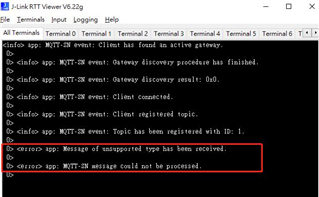
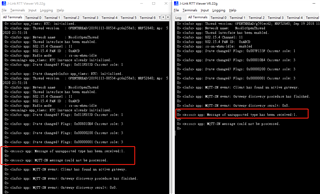
    and the error message show up
    "0> <error> app: Message of unsupported type has been received.
    0>
    0> <error> app: MQTT-SN message could not be processed."

    so the border router seems to be can only connect to one FTD

    if i connect two devices in the same time one of FTD will be kick of

    is there any reason may cause that? Or i miss some step need to be done?

    Please help me,thanks

    Best Regards,

    Rick.

  • Can you check which message type you are receiving when this problem occurs, for instance by printing it in mqttsn_packet_receiver.c:949:

    NRF_LOG_ERROR("Message of unsupported type has been received: %d.\r\n", message_type);

  • Hi Jørgen,

    I get the message_type is 1.

    both are the same.

    Pls kindly help advise how to solve it?

    Best Regards,

    Rick.

  • Hi Jørgen:

    How are you today!

    Are you have any advice? and are you have the same issue?

    Pls kindly help advise how to solve it?

    Best Regards,

    Rick.

  • Hi Rick,

    I tested this on my end, and I am seeing the same behavior. I believe that the unhandled event message happens because the second board is in a state where it does not expect to receive this event when the first board does a Gateway search. The examples are most likely not written with multiple publishers in mind.

    I'm not sure if the limitation is in the example code, or in the configuration of the Eclipse Paho MQTT-SN Gateway on the Raspberry Pi, but a workaround that seems to work is to disconnect after each node is done publishing (by pushing button 3), and reconnecting (by pressing button 3) on the second board before pressing button 4 to publish a message. You can also integrate this into a single button-press:

    case BSP_EVENT_KEY_3:
    {
        uint32_t err_code;
    
        if (mqttsn_client_state_get(&m_client) == MQTTSN_CLIENT_DISCONNECTED)
        {
            err_code = mqttsn_client_connect(&m_client, &m_gateway_addr, m_gateway_id, &m_connect_opt);
            if (err_code != NRF_SUCCESS)
            {
                NRF_LOG_ERROR("CONNECT message could not be sent. Error: 0x%x\r\n", err_code);
            }
        }
        while(ready_to_publish == false)
        {
            thread_process();
        }
        publish();
        while(ready_to_publish == true)
        {
            thread_process();
        }
        err_code = mqttsn_client_disconnect(&m_client);
        if (err_code != NRF_SUCCESS)
        {
            NRF_LOG_ERROR("DISCONNECT message could not be sent. Error: 0x%x\r\n", err_code);
        }
        break;
    }

    You also needs to declare the flag in top of main.c:

    static uint8_t ready_to_publish = false;

    And set/clear the flags in the appropriate event cases:

    case MQTTSN_EVENT_REGISTERED:
        NRF_LOG_INFO("MQTT-SN event: Client registered topic.\r\n");
        regack_callback(p_event);
        ready_to_publish = true;
        break;
    
    case MQTTSN_EVENT_PUBLISHED:
        NRF_LOG_INFO("MQTT-SN event: Client has successfully published content.\r\n");
        ready_to_publish = false;
        break;

    You can now remove/comment out the entire BSP_EVENT_KEY_2 case, as this is no longer needed.

    Attaching full main.c as well: 

    Best regards,
    Jørgen

Reply
  • Hi Rick,

    I tested this on my end, and I am seeing the same behavior. I believe that the unhandled event message happens because the second board is in a state where it does not expect to receive this event when the first board does a Gateway search. The examples are most likely not written with multiple publishers in mind.

    I'm not sure if the limitation is in the example code, or in the configuration of the Eclipse Paho MQTT-SN Gateway on the Raspberry Pi, but a workaround that seems to work is to disconnect after each node is done publishing (by pushing button 3), and reconnecting (by pressing button 3) on the second board before pressing button 4 to publish a message. You can also integrate this into a single button-press:

    case BSP_EVENT_KEY_3:
    {
        uint32_t err_code;
    
        if (mqttsn_client_state_get(&m_client) == MQTTSN_CLIENT_DISCONNECTED)
        {
            err_code = mqttsn_client_connect(&m_client, &m_gateway_addr, m_gateway_id, &m_connect_opt);
            if (err_code != NRF_SUCCESS)
            {
                NRF_LOG_ERROR("CONNECT message could not be sent. Error: 0x%x\r\n", err_code);
            }
        }
        while(ready_to_publish == false)
        {
            thread_process();
        }
        publish();
        while(ready_to_publish == true)
        {
            thread_process();
        }
        err_code = mqttsn_client_disconnect(&m_client);
        if (err_code != NRF_SUCCESS)
        {
            NRF_LOG_ERROR("DISCONNECT message could not be sent. Error: 0x%x\r\n", err_code);
        }
        break;
    }

    You also needs to declare the flag in top of main.c:

    static uint8_t ready_to_publish = false;

    And set/clear the flags in the appropriate event cases:

    case MQTTSN_EVENT_REGISTERED:
        NRF_LOG_INFO("MQTT-SN event: Client registered topic.\r\n");
        regack_callback(p_event);
        ready_to_publish = true;
        break;
    
    case MQTTSN_EVENT_PUBLISHED:
        NRF_LOG_INFO("MQTT-SN event: Client has successfully published content.\r\n");
        ready_to_publish = false;
        break;

    You can now remove/comment out the entire BSP_EVENT_KEY_2 case, as this is no longer needed.

    Attaching full main.c as well: 

    Best regards,
    Jørgen

Children
Related