nRF5 SDK is not maintained anymore
More Info: Consider nRF Connect SDK for new designs
This post is older than 2 years and might not be relevant anymore
More Info: Consider searching for newer posts

Thread Border Router networking fail

Hello Nordic Taam:

I follow the WEB steps below

https://infocenter.nordicsemi.com/index.jsp?topic=%2Fsdk_tz_v4.1.0%2Fthread_ot_performance_measurement.html

Software Development Kit > nRF5 SDK for Thread and Zigbee v4.1.0 > Thread > Thread tools > Thread Border Router

nRF52840 DK Version:nRF5_SDK_for_Thread_and_Zigbee_v4.1.0_32ce5f8\examples\thread\ncp\ftd\uart\hex

Raspberry Pi 3 Version:RaspPi_OT_Border_Router_Demo_v4.1.0-1.alpha

Use nRF52840 DK UART connect Raspberry Pi 3 to get the following information

wpan0 => [
"NCP:State" => "associating"
"Daemon:Enabled" => true
"NCP:Version" => "OPENTHREAD/20191113-00534-gc6a258e3; NRF52840; Apr 5 2020 21:51:18"
"Daemon:Version" => "0.08.00d (; Apr 21 2020 19:11:43)"
"Config:NCP:DriverName" => "spinel"
"NCP:HardwareAddress" => [F4CE363EC3C45B0E]
]


pi@raspberrypi:~ $ sudo wpanctl status
wpan0 => [
"NCP:State" => "uninitialized"
"Daemon:Enabled" => true
"NCP:Version" => ""
"Daemon:Version" => "0.08.00d (; Apr 21 2020 19:11:43)"
"Config:NCP:DriverName" => "spinel"
"NCP:HardwareAddress" => [F4CE363EC3C45B0E]
]

If I have the wrong steps or have not completed, please give me some pointers, thank you.

Also, can you teach me how to set up the Thread Border Router successfully on Raspberry Pi 3?

Best Regards

Rick.

Parents
  • Hi,

    The instructions on Thread Border Router is the latest and should be correct. It also looks like you are using the correct versions of the firmware and border router image. 

    I have tested this multiple times before, and have not had any issues with getting the network up and running.

    Are you using a revision 1 DK or later? Did you have the DK connected to the RPi before you booted it? Did you run 'erase all' command on the DK before flashing the NCP FW? You did not run any other commands on the border router prior to the "sudo wpanctl status" command?

    If nothing works, I would suggest that you start over and flash the DK and border router image again to the devices to see if that solves any issues.

    Best regards,
    Jørgen

  • Hi Jørgen:

    How are you today!

    Is there any update?

    Pls kindly help advise how to solve it?

    Best Regards,

    Rick.

  • Hi Jørgen,

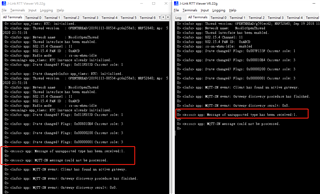
    I get the message_type is 1.

    both are the same.

    Pls kindly help advise how to solve it?

    Best Regards,

    Rick.

  • Hi Jørgen:

    How are you today!

    Are you have any advice? and are you have the same issue?

    Pls kindly help advise how to solve it?

    Best Regards,

    Rick.

  • Hi Rick,

    I tested this on my end, and I am seeing the same behavior. I believe that the unhandled event message happens because the second board is in a state where it does not expect to receive this event when the first board does a Gateway search. The examples are most likely not written with multiple publishers in mind.

    I'm not sure if the limitation is in the example code, or in the configuration of the Eclipse Paho MQTT-SN Gateway on the Raspberry Pi, but a workaround that seems to work is to disconnect after each node is done publishing (by pushing button 3), and reconnecting (by pressing button 3) on the second board before pressing button 4 to publish a message. You can also integrate this into a single button-press:

    case BSP_EVENT_KEY_3:
    {
        uint32_t err_code;
    
        if (mqttsn_client_state_get(&m_client) == MQTTSN_CLIENT_DISCONNECTED)
        {
            err_code = mqttsn_client_connect(&m_client, &m_gateway_addr, m_gateway_id, &m_connect_opt);
            if (err_code != NRF_SUCCESS)
            {
                NRF_LOG_ERROR("CONNECT message could not be sent. Error: 0x%x\r\n", err_code);
            }
        }
        while(ready_to_publish == false)
        {
            thread_process();
        }
        publish();
        while(ready_to_publish == true)
        {
            thread_process();
        }
        err_code = mqttsn_client_disconnect(&m_client);
        if (err_code != NRF_SUCCESS)
        {
            NRF_LOG_ERROR("DISCONNECT message could not be sent. Error: 0x%x\r\n", err_code);
        }
        break;
    }

    You also needs to declare the flag in top of main.c:

    static uint8_t ready_to_publish = false;

    And set/clear the flags in the appropriate event cases:

    case MQTTSN_EVENT_REGISTERED:
        NRF_LOG_INFO("MQTT-SN event: Client registered topic.\r\n");
        regack_callback(p_event);
        ready_to_publish = true;
        break;
    
    case MQTTSN_EVENT_PUBLISHED:
        NRF_LOG_INFO("MQTT-SN event: Client has successfully published content.\r\n");
        ready_to_publish = false;
        break;

    You can now remove/comment out the entire BSP_EVENT_KEY_2 case, as this is no longer needed.

    Attaching full main.c as well: 

    Best regards,
    Jørgen

  • Hi Jørgen,

    Thank you for your reply.

    if work is to disconnect after each node is done publishing, it can subscribe MQTT?
    because I follow the WEB steps below Playing with Thread and MQTT-SN on Nordic nRF52840, I need support to publish and subscribe at the same time in the device.

    Pls kindly help advise how to solve it?

    Best Regards,

    Rick.

  • I only tested the publisher, as it looked like this was the one you are using. 

    Are you having problem with two subscribers as well? You did not mention that you wanted to combine these operations, that may require large modifications of the examples.

Reply Children
  • Hi Jørgen,


    1. I did not use the publish of two devices.
    I use this example "Thread MQTT-SN Example".
    Use one device of the MQTT-SN Subscriber application and other one device of the MQTT-SN Publisher application. (one publish device, one subscribe device)

    2. Yes, two subscribers well the same problems too. do you have any advice that can solve the problems of two subscribers?

    3. Now I have two devices, wanted to combine operations publish and subscribe at the same time in the device.
    Pls kindly help advise how to solve it?

    Best Regards,

    Rick.

  • Hi Rick,

    Your latest questions is getting far outside of the topic of this thread. Can you please post it in a new thread, to prevent this from getting too messy? That will help other users with similar questions find the information much more easily.

    If you do that, we will try to help you achieve what you want.

    Best regards,
    Jørgen

  • Hi Jørgen:

    I created a new thread is Thread MQTT-SN Example publish and subscribe can not combine operations ,

    Pls kindly help advise how to solve it?

    Best Regards,

    Rick.

  • Hi Jørgen:

    Now I have support IPv6 from ISP and Router is (ASUS RT-AX56U),but I still not get /62 prefix.

    this is my ifconfig from RPi .

    pi@raspberrypi:~ $ ifconfig eth0
    
    eth0: flags=4163<UP,BROADCAST,RUNNING,MULTICAST>  mtu 1500
    
            inet 192.168.50.103  netmask 255.255.255.0  broadcast 192.168.50.255
    
            inet6 2001:b030:214e:2200:****:****:****:****  prefixlen 64  scopeid 0x0<global>
    
            inet6 fe80::ba27:ebff:feda:4146  prefixlen 64  scopeid 0x20<link>
    
            ether b8:27:eb:da:41:46  txqueuelen 1000  (Ethernet)
    
            RX packets 870  bytes 76151 (74.3 KiB)
    
            RX errors 0  dropped 0  overruns 0  frame 0
    
            TX packets 530  bytes 78362 (76.5 KiB)
    
            TX errors 0  dropped 0 overruns 0  carrier 0  collisions 0

    and the WEB steps description, How can I setting DHCPv6 service for Rpi and disable autoconfig?

    When dealing with the native IPv6 connectivity, make sure you use the DHCPv6 service and not the popular Stateless Address Autoconfiguration (SLAAC) tool. This autoconfig tool will only provide a 64-bit long prefix that is not sufficient to delegate a new 64-bit long prefix for the Thread network.

    Best Regards,

    Rick.

  • Hi,

    I do not have this router available, so unfortunately I'm not able to help you with configuration of this. You should contact the manufacturer of the router (Asus) to get help on configuration and details about whether this router can support larger address spaces. I have only been able to get this to work with a router running OpenWRT firmware, but I have not tested on a large number of devices..

    Best regards,
    Jørgen

Related